Detroit Free Press: Freep
- 3.0
- Rating
- 100.00K
- Installs
- Free
- Price

 Analysis by App-foxy
When I open Detroit Free Press: Freep, I am looking for a practical way to catch up on Detroit-area reporting without sorting through a long list of unrelated sources. This News & Magazines app brings together breaking news, the eNewspaper, entertainment coverage, and local sports in one place. That combination makes it more useful than a simple headline reader, especially when I want both quick updates and a fuller newspaper-style reading experience.
The app is free to install, and it comes from USA TODAY Co. Its store listing places it in the Everyone 10+ age group, so it is aimed at a broad audience while still recognizing that news can sometimes involve mature subjects. I would recommend it to readers who care about Detroit and want one familiar destination for local coverage. I would be more cautious about recommending it to someone who only wants a completely neutral, national news feed or who dislikes the possibility of in-app purchases.
What to expect from Freep
The first thing I noticed about the app is that it serves two different reading habits. One is the quick check: open the app, scan the latest headlines, and find out whether something important has happened. The other is the slower newspaper session, where I spend more time with the eNewspaper or browse sections such as entertainment and local sports. Those modes complement each other, but they do not feel identical, so it helps to know which one you want before you start tapping around.
You May Also Like

 Blood Strike: 2.5 Anniversary
Blood Strike’s Loadouts Turn Every Drop Into a Tactical Gamble
A close look at Blood Strike’s custom loadouts: how fast access to signature weapons reshapes its battle royale rhythm, rewards preparation, and narrows the gap between fights.

 Pandora - Music & Podcasts
Pandora’s Music Is Easy to Start, but Harder to Recover
Pandora’s strength is its low-effort path from a seed to a station. Its weak spot is how much confidence it asks you to place in connection, setup, and quiet recovery.

 8 Ball Pool
 Is Built on Rivalries, Rematches, and Routine
A close look at the rivalries, rematches, shared routines, and unanswered safety questions that turn a quick pool match into a persistent mobile community.

 Samsung Music
’s Quiet Strength Is Playing What You Already Own
Its reach comes less from spectacle than from dependable access to a personal library. That simplicity is both the app’s strongest retention engine and its ceiling.

 AccuWeather: Weather Radar
AccuWeather Review: A Quick, Clear Forecast for Everyday Decisions
For everyday plans, the best forecast is the one you can understand quickly. AccuWeather makes rain timing, radar, and local conditions easy to act on, with a few trade-offs.

 Hill Climb Racing
Why Hill Climb Racing Still Turns Crashes Into One More Run
A tiny car, a bumpy hill and one more upgrade: Hill Climb Racing keeps resurfacing because its simple chaos makes every near-miss feel personal.
More From Our News Desk



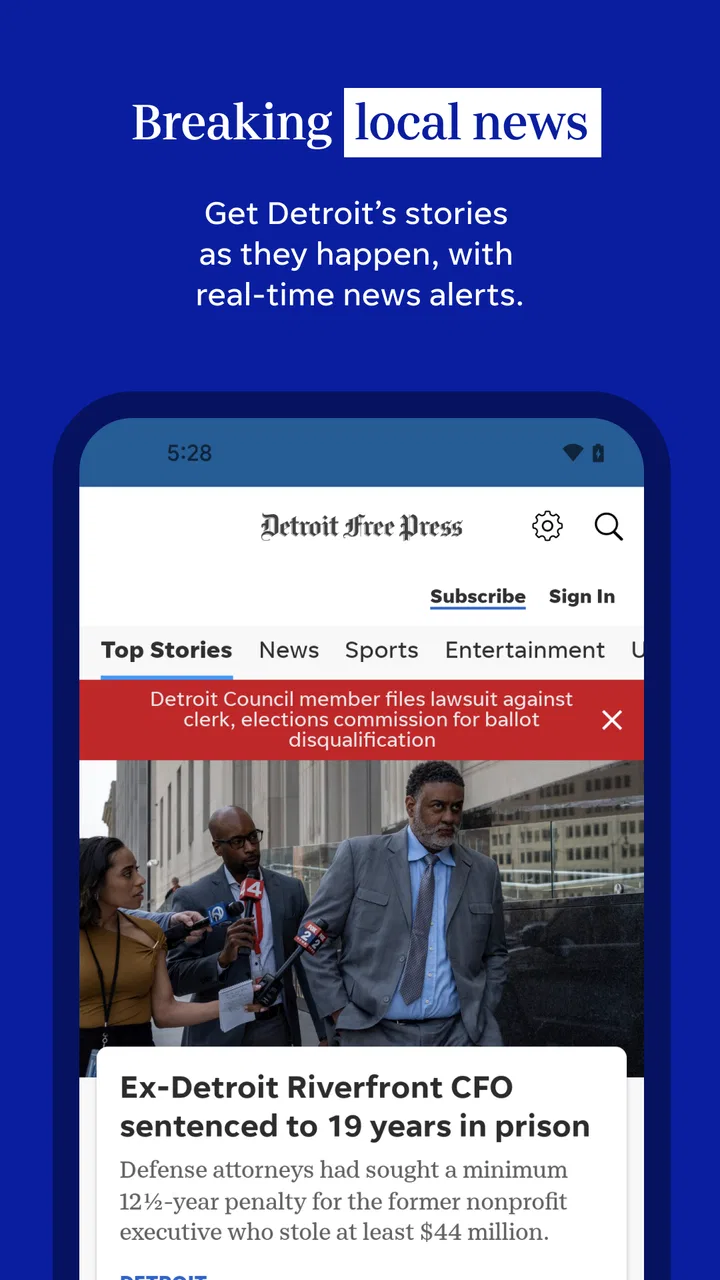
The breaking-news side is best for short visits during a commute, lunch break, or quiet moment at home. I can use it to get oriented without committing to a long reading session. The local focus also gives it a clear purpose: instead of asking a broad news app to understand the details of Detroit life, I start with a publication built around that audience.
The eNewspaper side is more appealing when I want the structure and feel of a traditional publication. I find this especially useful on weekends or when I want to browse beyond the most urgent headlines. It encourages a different rhythm from a constantly refreshing feed. Rather than reacting only to whatever appears first, I can move through the publication and choose stories based on interest.
Entertainment and local sports add value for readers who want more than public affairs. A Detroit sports follower may open the app for a game-related update, then stay for another local story. Someone interested in arts, television, or community events gets a similar reason to return. In my experience, this mix is one of the app’s strongest arguments over a single-purpose news alert tool.
At the same time, I would not treat it as a replacement for every other news source. Its local identity is its advantage, but readers who want extensive international reporting, a wide range of specialist publications, or a highly customizable multi-source dashboard may prefer a general news aggregator. The choice depends on whether depth in one region matters more to you than breadth across many outlets.
The app has been available since September 14, 2010, and the current version is 8.10.3. It supports devices running Android 8.0 or later. Those details matter if you are using an older phone or tablet: before planning to read on an aging device, I would check the operating system rather than assuming every Android device can install it.
Its average rating is 3.0 from around 2.5 thousand ratings, with around 1 thousand written reviews. I read that as a reason to approach the app with realistic expectations. It is clearly useful to a portion of its audience, but the rating also suggests that the experience may not satisfy everyone equally. I would pay attention to how much I value local coverage, how comfortable I am with the app’s reading flow, and whether I want optional paid content before making it my only news source.
Starting without getting lost
After installing it, my advice is not to judge the whole app from the first screen alone. Begin by looking for the latest local story that genuinely matters to you. That gives you a simple test: can you reach useful reporting quickly, and does the presentation make you want to continue? If the answer is yes, then explore the eNewspaper and the other sections afterward rather than trying to understand every part at once.
A useful first routine is to open the app at a time when you normally check news, scan the current headlines, and choose one article instead of opening several at once. Read it fully, then return to the main reading flow. This small approach helps reveal whether the app works for your attention span. Some readers prefer a fast stream of updates; others want a calmer publication layout. Freep attempts to support both, but your preferred mode will determine how comfortable it feels.
I also recommend treating the eNewspaper as a separate destination rather than assuming it behaves exactly like the breaking-news area. A newspaper edition is designed for browsing, while urgent headlines are designed for speed. If you are in a hurry, start with the news feed. If you have time to explore, move to the eNewspaper and use it as your longer reading session. That distinction is one of the most helpful things to understand during the first few uses.
Your first meaningful success
For a first-time user, success should mean more than simply opening the app. I would define it as finding one relevant Detroit story, reading it without friction, and then discovering a second section that matches a personal interest. For example, I might begin with a local news article, then check sports or entertainment before closing the app. That short journey tells me whether the publication has enough variety to fit naturally into my day.
A realistic scenario would be a weekday morning when I have only a few minutes. I open Freep, scan the newest local headlines, read the one that affects my area or interests, and leave. Later, perhaps in the evening, I return to browse the eNewspaper more slowly. This two-stage habit makes better use of the app than trying to consume everything in one sitting. It also prevents the common mistake of expecting a newspaper edition and a breaking-news feed to serve exactly the same purpose.
Another useful workflow is to use the app as a local starting point before checking broader coverage elsewhere. If a Detroit story catches my attention, I can first understand the local angle here, then compare it with a national outlet if the subject has wider importance. That gives Freep a defined role instead of forcing it to compete with every source on my phone.
Readers who follow Detroit sports may find an especially natural routine. A quick visit can provide the local sports angle, while the rest of the app remains available for city news and entertainment. The trade-off is that a dedicated sports app may offer a more specialized experience for someone who wants nothing but scores, schedules, or team updates. Freep makes more sense when sports are one part of a broader local-news habit.
The same principle applies to entertainment. If I want local context alongside general entertainment stories, the app is convenient. If I want a highly personalized celebrity or streaming-news feed, a specialist service may be faster. I see Freep as a publication with several local entry points, not as an endlessly customizable entertainment platform.
Where new users may hesitate
The biggest possible confusion is the difference between free access and the presence of in-app purchases. The app itself is free, but listed purchases range from around two dollars to around seventy dollars per item. That does not mean every reader must buy something, but it does mean I would read any purchase screen carefully and avoid assuming that every part of the experience is covered simply because installation costs nothing.
This is particularly important for someone who mainly wants occasional headlines. If your needs are limited to checking a few local updates, the free starting point may be enough for your routine. If you want a more complete newspaper experience, you should pay attention to what the app presents as optional access and decide whether that matches your reading budget. I would not make that decision in a hurry after installing.
Another point of friction is deciding whether to read individual stories or browse the eNewspaper. These are not competing buttons so much as different ways of using the publication. New users may open the app expecting one perfectly linear path and wonder why the experience changes when they move into the newspaper edition. I found it easier once I accepted that one area is for quick discovery and the other is for deliberate browsing.
The rating also suggests that personal expectations matter. A reader who wants constant speed, minimal layout changes, and only the most compressed summaries may find a newspaper-oriented app less direct than a headline aggregator. A reader who values local reporting and wants a broader publication mix may be more forgiving of the extra browsing. Neither preference is wrong; they simply lead to different judgments of the same app.
I would also avoid using it as the only source for a major developing story. That is not a criticism unique to this app; breaking events can change quickly, and checking more than one reputable source is sensible. Freep is valuable for its Detroit perspective, but a second source can add national or specialist context when the subject reaches beyond the region.
Privacy and device comfort are also worth considering in ordinary terms. Before settling into a long reading session, I would make sure the phone has enough battery and that the text presentation is comfortable for me. On a small screen, a full eNewspaper experience may feel less relaxed than it does on a larger phone or tablet. Someone who mainly reads at a desk may prefer a bigger display, while a commuter may appreciate having local coverage in a pocket-sized format.
How it compares with familiar alternatives
Compared with a general news aggregator, Detroit Free Press: Freep feels more focused. An aggregator is better when I want many publishers, subjects, and viewpoints gathered into one customizable stream. Freep is better when I want a publication with a clear Detroit center and a combination of local news, sports, entertainment, and newspaper-style reading.
Compared with a browser shortcut to a news website, the app offers a more direct, dedicated reading path. The advantage is convenience: I can open the publication as its own destination rather than starting in a browser and navigating from there. The disadvantage is that a browser makes it easier to switch between several sources immediately. If comparison shopping across publications is central to my routine, the browser may remain more flexible.
Compared with a dedicated sports app, Freep is less specialized but more rounded. I would choose the sports app for a narrow, statistics-first routine and Freep for a local-news habit in which sports are part of the day rather than the entire day. Compared with a magazine-only reader, Freep is more timely and regionally grounded, while a magazine service may offer a broader range of long-form titles.
The eNewspaper also gives it a different character from social feeds. Social platforms can surface stories quickly, but they mix reporting with commentary, repetition, and unrelated posts. Freep provides a more intentional publication environment. The trade-off is that social feeds may feel faster and more personalized, while Freep asks me to browse a little more deliberately.
Who should install it, and who should skip it
I think the app is a good fit for Detroit residents, former residents who still follow the area, commuters, local sports fans, and readers who want regional reporting alongside entertainment coverage. It is also useful for someone trying to replace a scattered routine of checking several local sources with one recognizable publication.
I would be less likely to recommend it to a person who wants only global headlines, a completely ad-free or purchase-free reading experience, or an app built around aggressive personalization. It may also be the wrong choice for readers whose main goal is specialist coverage outside Detroit. In those cases, a broad aggregator, a national publication, or a dedicated subject app may do a better job.
For families, the Everyone 10+ label is a helpful general guide, but I would still remember that news topics vary. Parents who share a device with younger children may prefer to supervise what is read, especially during major events. The age label should not be treated as a promise that every headline will be suitable for every child.
My recommendation after using the whole path
My preferred way to use Freep is simple: start with one local headline, read it completely, then explore either the eNewspaper or a section such as sports or entertainment depending on my mood. That sequence creates a meaningful first session without making the app feel like homework. It also helps me decide whether the publication deserves a regular place on my home screen.
The app’s strongest quality is its combination of local identity and multiple reading styles. I can use it briefly for urgent news or return for a longer newspaper session. That flexibility is more useful than a generic promise to “stay informed,” because it maps to real situations: a quick morning check, a sports update after work, or a slower weekend browse.
Its limitations are equally clear. The moderate average rating means the experience will not be universally satisfying, and the in-app purchase range means I should understand what I am choosing before spending money. Readers who want a broad, highly personalized news universe may be happier elsewhere. Readers who want Detroit-focused reporting in a dedicated app should find enough here to justify trying it.
In my view, Detroit Free Press: Freep is worth installing when local coverage is the main reason you open a news app. I would begin with the free experience, test the breaking-news flow, and then decide whether the eNewspaper fits my habits. The best reason to keep it is its local focus combined with a genuine newspaper-reading option; the best reason to skip it is wanting a simpler, wider, or more specialized alternative.
FAQs for Detroit Free Press: Freep
01What is Detroit Free Press: Freep?
Detroit Free Press: Freep is the official mobile app for accessing news from the Detroit Free Press. It brings local reporting, breaking news, sports coverage, entertainment, business updates, opinion pieces, and community stories together in one place. During testing, the app was most useful for readers who want Detroit-area coverage in a streamlined format rather than relying only on a mobile browser.
02Is Detroit Free Press: Freep free to download and use?
The app can generally be downloaded at no cost, allowing users to browse available content and explore the publication’s sections. However, some articles or features may be limited by a subscription or digital access plan. Before downloading, check the current pricing and access terms shown in the App Store or Google Play listing, since promotional offers, article limits, and subscription conditions may change.
03What type of news and content can I find in the Freep app?
The application focuses primarily on Detroit and Michigan news, including local government, neighborhoods, crime, education, transportation, and community developments. It also includes Detroit sports, national and international stories, business, food, culture, entertainment, and opinion content. The exact sections and presentation may vary with updates, but the strongest reason to use the app is its regional reporting.
04Does Detroit Free Press: Freep require an internet connection?
An internet connection is normally required to load current articles, photographs, videos, advertisements, and breaking-news updates. The app may retain recently viewed information temporarily, but it should not be treated as a full offline reader. Users traveling with limited data can reduce mobile usage by relying on Wi-Fi when possible and reviewing the app’s available notification or data settings.
05Can I receive breaking-news alerts and manage notifications?
Yes, the Freep app is designed to provide news notifications, which can be useful for major Detroit developments, sports updates, and other urgent stories. Notification behavior depends on the permissions granted on your Android or iOS device and on the app’s current settings. After installation, review the notification controls so you receive important alerts without being overwhelmed by every update.
Pros
- Covers Detroit news
- local politics
- sports
- and community stories in one app.
- Breaking-news alerts help users stay informed about important local developments.
- Clean layout makes articles easy to browse on phones and tablets.
- Includes access to investigative journalism and in-depth regional reporting.
- Supports saving articles for later reading when time is limited.
Cons
- Many premium articles require a paid subscription to read in full.
- Some content may load slowly on weaker mobile connections.
- Frequent notifications can feel excessive unless carefully customized.
- The app may use noticeable storage for downloaded content and media.
- Coverage is highly Detroit-focused and may feel limited for nonlocal readers.

Detroit Free Press: Freep
Gallery